Local Weather Forecast
- 4.6
- Rating
- 5.00M
- Installs
- Free
- Price
 Analysis by App-foxy
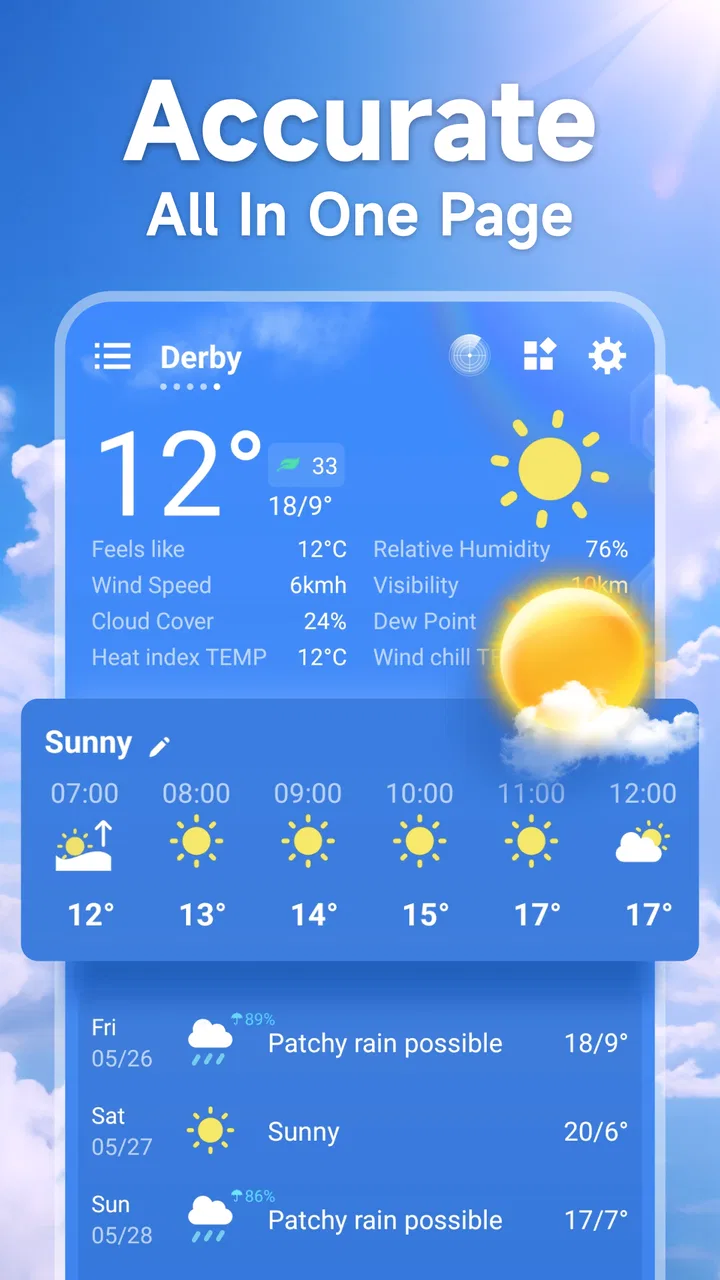
Weather apps are easy to judge in a quiet room and much harder to judge when I am standing outside, trying to decide whether I need a jacket, whether a walk is sensible, or whether I should delay a trip. That is where Local Weather Forecast, a free weather app from Tools Dev, makes its case. I found it most useful as a quick local reference: open it, check the current conditions and forecast, and make a decision without digging through a crowded interface.
The app has been around since December 23, 2016, and its current version is 4.27.1. It is available for Android devices running Android 6.0 or later, with an Everyone content rating. Its popularity is also easy to understand: it has passed five million installs, carries a 4.6 average from around thirty-nine thousand ratings, and has about two thousand six hundred written reviews. Those figures suggest a mature, widely used weather tool rather than an experimental download.
How the forecast feels when the network matters
My first impression is that Local Weather Forecast is built around immediacy. The central question is not “What can this app do?” but “What is the weather near me right now, and what should I expect next?” That focus suits people who want a practical answer instead of a large collection of maps, articles, alerts, and lifestyle content.
You May Also Like

 Blood Strike: 2.5 Anniversary
Blood Strike’s Loadouts Turn Every Drop Into a Tactical Gamble
A close look at Blood Strike’s custom loadouts: how fast access to signature weapons reshapes its battle royale rhythm, rewards preparation, and narrows the gap between fights.

 Pandora - Music & Podcasts
Pandora’s Music Is Easy to Start, but Harder to Recover
Pandora’s strength is its low-effort path from a seed to a station. Its weak spot is how much confidence it asks you to place in connection, setup, and quiet recovery.

 8 Ball Pool
 Is Built on Rivalries, Rematches, and Routine
A close look at the rivalries, rematches, shared routines, and unanswered safety questions that turn a quick pool match into a persistent mobile community.

 Samsung Music
’s Quiet Strength Is Playing What You Already Own
Its reach comes less from spectacle than from dependable access to a personal library. That simplicity is both the app’s strongest retention engine and its ceiling.

 AccuWeather: Weather Radar
AccuWeather Review: A Quick, Clear Forecast for Everyday Decisions
For everyday plans, the best forecast is the one you can understand quickly. AccuWeather makes rain timing, radar, and local conditions easy to act on, with a few trade-offs.

 Hill Climb Racing
Why Hill Climb Racing Still Turns Crashes Into One More Run
A tiny car, a bumpy hill and one more upgrade: Hill Climb Racing keeps resurfacing because its simple chaos makes every near-miss feel personal.
More From Our News Desk
View All News


The important connectivity detail is that the usefulness of a weather app depends on receiving current forecast information. When I have a reliable connection, the experience is straightforward: I can check the local outlook before leaving home, then check again when conditions seem uncertain. The app’s value comes from that current exchange of information, not from treating an old forecast as permanently dependable.
This becomes especially noticeable during changing weather. A forecast checked in the morning may feel adequate for a routine commute, but it is less reassuring when clouds are building, temperatures are shifting, or rain looks close. In those moments, I prefer to open the app again rather than rely on what I saw earlier. That habit is more important than any single forecast screen.
Compared with a phone’s built-in weather panel, Local Weather Forecast feels like a dedicated place for checking local conditions. The usual alternative is often convenient because it is already on the device, but convenience can also mean less attention to the forecast itself. Here, opening a separate weather app creates a small, deliberate pause: I am checking the weather rather than passively noticing a temperature widget.
On the other hand, people who want radar layers, detailed storm tracking, specialist meteorological charts, or a broad collection of weather sources may find this approach too limited. I would not choose it as my only tool for serious outdoor planning where fine-grained weather analysis is essential. Its strength is everyday clarity, not an expert forecasting workstation.
A useful routine for commuting and errands
One realistic use case is a short morning routine. Before leaving, I check the local forecast to decide between light clothing and a warmer layer. If I am carrying a laptop or shopping bags, I also use the forecast as a reason to choose a more sheltered route or postpone an unnecessary errand. The app does not need to dominate my morning; a brief check is enough.
I also like the idea of checking it at the point when a plan changes. If a lunch walk becomes an evening walk, I would open the app again rather than assume the earlier conditions will continue. This is where a local weather app earns its place: not by replacing judgment, but by giving that judgment a current starting point.
What changes when I use it on mobile
Mobile weather checking is usually done in awkward places: beside a doorway, on public transport, in a car park, or while deciding whether to continue an outdoor activity. I found that the app makes more sense in these brief sessions than in long browsing sessions. I want readable information quickly, and I do not want to spend time learning a complicated weather dashboard.
That simplicity has a trade-off. A compact local forecast is easier to consult, but it may not answer every question a more specialized app can answer. For example, someone planning a long hike may want a much deeper view of conditions across several locations and elevations. A parent deciding whether children need rainwear for school, however, probably benefits more from a quick local check than from a dense chart.
Location is another practical consideration. A local forecast is only as useful as the place being examined. When I move between home, work, and another town, I need to pay attention to which location the app is showing instead of assuming that nearby places will share identical conditions. That is a small but important habit, especially when weather changes across a wider area.
I would also avoid treating the application as a substitute for looking outside. Weather information can guide a decision, but a quick glance at the sky, the road, and the conditions around me still matters. A forecast may say one thing while a local shower is already arriving. In that situation, the app helps me understand the broader expectation, while direct observation handles the immediate reality.
When a connection is slow or unavailable
The most important limitation is also the easiest to overlook: current weather information requires a connection to retrieve current information. If the network is slow, the app may take longer to become useful, and if I cannot connect, I should not assume that a displayed forecast represents the present moment. I treat any previously loaded information cautiously when the surrounding conditions have changed.
This affects how I prepare for travel. Before heading somewhere with uncertain reception, I would check the forecast while I still have a dependable connection and remember that the information can age. That is not the same as expecting guaranteed offline forecasting. It is simply a sensible way to reduce the chance of being caught without a recent reference.
Recovery is usually a matter of patience and verification rather than repeatedly tapping the screen. If the forecast does not appear promptly, I would first check whether the phone has a working connection, then try again later. If the app returns information after a delay, I would compare it with what I can see outside before making a high-consequence decision.
This is where Local Weather Forecast differs from some larger weather services. Bigger alternatives may offer more ways to cross-check conditions, including multiple views or richer visual tools. That can be reassuring during unstable weather, but it can also make the experience slower and more distracting. I prefer Local Weather Forecast when I want one clear local check, while I would look elsewhere when I need extensive confirmation.
Using it without wasting mobile data
Weather checking does not need to become a constant background ritual. My practical approach is to open the app at decision points: before leaving, before changing plans, and before an activity that depends strongly on conditions. That gives me useful updates without refreshing every few minutes out of habit.
People on limited mobile data should be especially deliberate. I would check the forecast over Wi-Fi when planning the day, then use mobile data for occasional updates when necessary. The exact cost of using an app depends on the device, network, and how often it is opened, so I would not assume that every refresh has the same impact. The broader lesson is simple: current information is valuable, but constant checking is rarely needed for ordinary errands.
A second useful habit is to avoid refreshing just because the forecast feels emotionally unsatisfying. If I am hoping a picnic will work, repeated checks will not improve the weather. I would rather check at a sensible interval, make a backup plan, and stop spending attention on the forecast. This makes the app a decision aid instead of a source of unnecessary uncertainty.
For travelers, I would check the destination rather than only the current location. A local forecast is most helpful when it reflects where I am actually going to be. If I am crossing between areas with different conditions, I would treat the forecast as location-specific and recheck after arrival. That workflow is more reliable than assuming a single reading covers an entire journey.
Who will appreciate the focused design
I think Local Weather Forecast is a good fit for someone who wants a dedicated, uncomplicated weather app. It suits commuters, students, families, casual walkers, and anyone who regularly asks whether to carry an umbrella or add another layer. The free price also makes it easy to try without turning the decision into a purchase.
The Everyone rating makes it suitable for a broad audience, including households looking for a simple way to check conditions. I would recommend it to a friend who dislikes busy interfaces and wants local weather information without a lot of extra material competing for attention.
I would be more cautious about recommending it to a weather enthusiast or a professional whose plans depend on detailed analysis. If you need specialized forecasting tools, extensive visual layers, or a deeper comparison between several services, the usual advanced alternatives may be a better match. The app’s focused character is a benefit until your questions become more technical.
Small trade-offs that affect everyday usefulness
The first trade-off is speed versus depth. A focused weather app can be quicker to understand, but it may leave less room for the kind of detail that helps with complex outdoor decisions. I see that as a deliberate boundary rather than a defect, provided users choose it for ordinary local planning.
The second is freshness versus connectivity. The more important the decision, the more recently I want to check the forecast, but the more I depend on a working connection at that moment. For routine plans, an earlier check may be enough. For rapidly changing conditions, I would make a fresh check immediately before leaving and avoid relying on stale information.
The third is convenience versus attention. A built-in weather widget may be faster for a glance, while this app can encourage a more intentional check. Whether that is better depends on the person. I like the separate app when I want to focus on the local forecast, but someone who only wants a temperature visible on the home screen may prefer the built-in option.
One more practical point is compatibility. Because the app supports Android 6.0 and later, it can serve people using older Android phones as well as newer devices. That broad reach is useful for families sharing different phones or for anyone who keeps an older handset as a backup. I would still make sure the device itself can run the current version smoothly before relying on it as my main weather reference.
My verdict on Local Weather Forecast
After using it as a day-to-day weather companion, I see Local Weather Forecast as a sensible choice for local checks rather than an all-purpose meteorological platform. Tools Dev has kept the idea easy to understand: open the app, look at the conditions for the place that matters, and use that information to make a practical choice.
The best reason to use it is its balance between a focused local forecast and a low-friction mobile routine. It works particularly well when I need a quick answer before commuting, shopping, walking, or changing plans. Its free availability, broad device compatibility, and strong user response make it an easy app to test for everyday needs.
I would not depend on it blindly during severe or rapidly changing weather, and I would not choose it over a more advanced service for technical outdoor planning. Connectivity also shapes the experience: a current forecast is most useful when the app can retrieve fresh information, while slow or unavailable service requires patience and common sense.
For a friend who wants a straightforward weather app and does not need a wall of charts, I would recommend Local Weather Forecast. I would explain that its real advantage is not doing everything; it is making the ordinary weather decision feel quick and manageable. If that is exactly what you need, this app is worth keeping on your phone.
FAQs for Local Weather Forecast
01How accurate is the Local Weather Forecast app?
The Local Weather Forecast app utilizes data from multiple trusted sources and advanced algorithms to provide highly accurate weather predictions. However, like all weather forecasts, there can be occasional discrepancies due to rapidly changing atmospheric conditions. For the most reliable results, it's recommended to check the app frequently, especially in volatile weather conditions.
02Does the app require internet access to function?
Yes, the Local Weather Forecast app requires an internet connection to update and provide the latest weather data. While some features like previously downloaded forecasts can be accessed offline, real-time updates and alerts necessitate an active internet connection. It's advisable to ensure connectivity for the most accurate and timely weather information.
03Can I customize the alerts and notifications?
Absolutely. The app allows you to customize alerts based on your preferences. You can set notifications for severe weather warnings, temperature changes, or daily forecasts. This level of customization ensures that you only receive the most relevant updates, tailored to your specific needs and location preferences.
04Is the Local Weather Forecast app free to use?
The app offers a free version with essential features for everyday weather tracking. However, there is also a premium version available for purchase, which includes additional features such as ad-free usage, advanced radar maps, and extended forecast options. Users can choose the version that best suits their needs.
05How user-friendly is the app for beginners?
The Local Weather Forecast app is designed with user-friendliness in mind. Its intuitive interface makes it easy for users of all experience levels to navigate. The app includes helpful tutorials and guides for first-time users, ensuring a smooth experience. Whether you need basic weather updates or detailed forecasts, the app caters to both novice and advanced users.
Pros
- Accurate real-time weather updates.
- User-friendly interface with easy navigation.
- Customizable alerts and notifications.
- Detailed hourly and weekly forecasts.
- Supports multiple locations for tracking.
Cons
- Advertisements can be distracting.
- Limited offline functionality.
- Some features require a subscription.
- Occasional delays in data updates.
- Battery consumption can be high.

Local Weather Forecast
Gallery